
If you run games through Yuzu or any Switch emulator, the file format matters more than most people expect. A lot of common problems trace back to this: a game that refuses to appear in your library, an update that won’t install, or errors that seem to come out of nowhere. More often than not, it’s just the wrong file being used in the wrong place.
Below is a plain-language rundown of the different Nintendo Switch game formats and what each one is actually meant for, so you know when to use what and avoid the usual headaches.
Quick Answer (For Beginners)
Use XCI files for physical game cartridges.
Use NSP files for digital games, updates, and DLC.
That’s enough for most users. If you want to go deeper, keep reading.
XCI (Game Cartridge Dumps)
An XCI file is basically a dump of a physical Switch cartridge. It’s the closest thing to sliding a real game card into the console, just without the plastic shell. Everything the cartridge contains is packed into a single file.
XCI files usually include:
- The full game data
- Game icons and metadata
- Sometimes bundled updates
Best use case:
XCI makes the most sense if the game came from a cartridge you actually own and backed up yourself.
NSP (Digital Games, Updates, and DLC)
NSP is the format you’ll run into most often, especially if you’re dealing with digital releases. It’s the same package type the Switch uses for eShop downloads and installs, which is why emulators handle it so well.
An NSP can contain:
- Base game files
- Game updates
- DLC content
- Required metadata for the Switch system
Best use case:
If you’re installing a digital title, updating a game, or adding DLC in Yuzu, NSP is usually the easiest route.
NCA (The Core Building Blocks)
NCA files sit much lower level than XCI or NSP. They’re the actual data chunks the Switch uses internally, and most of the time you won’t ever touch them on purpose.
An NCA file can store:
- Game data
- System files
- Updates
- Encryption and verification data
Best use case:
Unless you’re digging into how things work under the hood, doing research, or setting up something very specific. There’s usually no reason to load NCAs manually.
Deconstructed ROM Directories
A deconstructed ROM directory is what’s left after an NCA or sometimes an NSP. It has been unpacked into its individual files and folders. Nothing is bundled anymore; you’re looking at the game’s internals laid out in plain sight.
This format is typically used for:
- Debugging
- Modding
- Game development
- Advanced testing
Best use case:
For regular play, it’s overkill and often more trouble than it’s worth. It’s really aimed at developers or experienced users who know exactly what they’re looking for and why.
NSO and NRO (Homebrew Applications)
These formats are not commercial games. They’re used for homebrew software created by the Switch community.
- NRO files are the most common homebrew apps
- NSO files are usually system-level or developer-focused binaries
You’ll find tools, utilities, emulators, and experimental projects in these formats.
Best use case:
Running unofficial apps, tools, or custom software inside Yuzu.
Explaining In Diagram
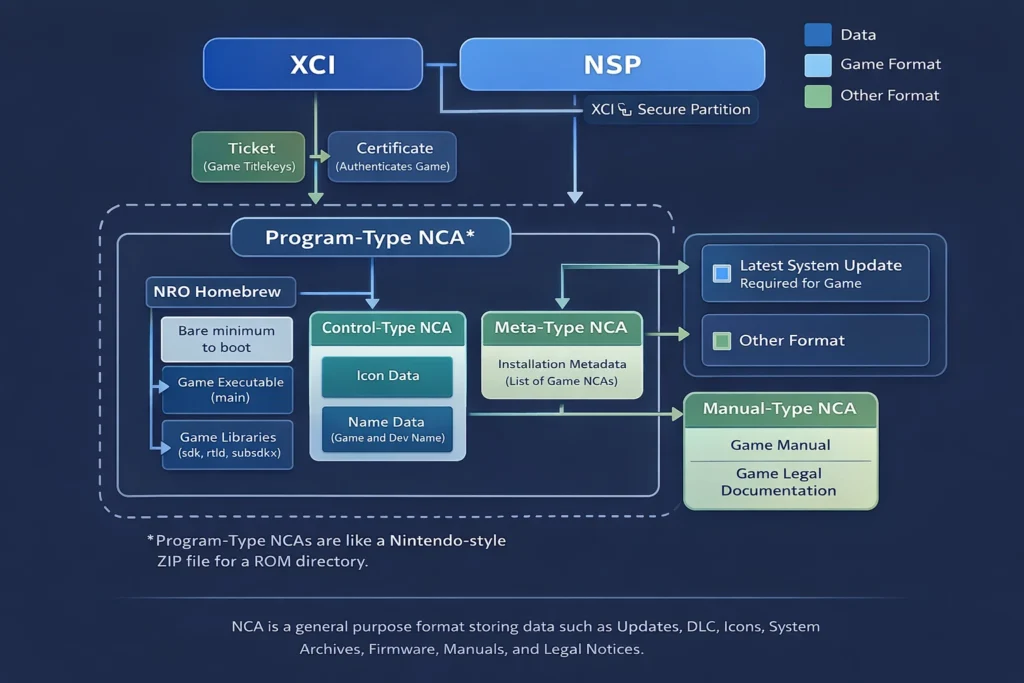
Which Format Should You Use?
Here’s the simple rule that works for almost everyone:
- Physical game dump → XCI
- Digital game, update, or DLC → NSP
- System files or advanced tasks → NCA
- Development or modding → Deconstructed ROM
- Community-made apps → NRO / NSO
Using the correct format avoids many common emulator errors.
Troubleshooting Tip
If a game fails to launch or install, don’t assume the emulator is broken. File format issues are one of the most common causes. When something doesn’t work, always check the emulator’s error codes and logs before changing settings randomly.